viewof consulta = {
const f = html`<form class="lab-form">
<div class="row g-2">
<div class="col-md-5"><label class="form-label" for="lab-a">Concept A</label>
<input id="lab-a" name="a" class="form-control form-control-sm" value='smartphone OR "mobile phone"'></div>
<div class="col-md-5"><label class="form-label" for="lab-b">Concept B</label>
<input id="lab-b" name="b" class="form-control form-control-sm" value='"academic performance"'></div>
<div class="col-md-2 d-flex align-items-end"><button class="btn btn-primary btn-sm w-100" type="submit">Search</button></div>
</div></form>`;
f.value = {a: f.a.value, b: f.b.value};
f.onsubmit = e => { e.preventDefault(); f.value = {a: f.a.value.trim(), b: f.b.value.trim()}; f.dispatchEvent(new Event("input", {bubbles: true})); };
return f;
}Unit 2. Information retrieval
NoteObjectives
- Apply the principles and strategies of information retrieval.
- Use general and specialised resource platforms.
- Organise the information you find.
Required reading
Bates, M. J. (1989). The design of browsing and berrypicking techniques for the online search interface. Online Review, 13(5), 407-424.
Further reading
1. From the need to the strategy
Every search begins with an information need: what you want to know and why. Before typing anything into a search engine:
- Formulate the question in one sentence: “How does mobile phone use affect university students’ academic performance?”.
- Identify the concepts: mobile phone use, academic performance, university students.
- Find synonyms and related terms for each concept, in English and, if useful, in other languages (smartphone, mobile phone, cell phone; academic performance, achievement; university students, undergraduates).
- Decide the limits: language, dates, type of document.
Bates (1989) showed that real searching is not a single query that returns the perfect set, but a process she called berrypicking: the need changes as you read, you pick up useful pieces at each step and you use a variety of techniques (following an article’s references, searching for an author, browsing a journal). Marchionini (2006) calls exploratory search the kind that is used to learn about a topic, as opposed to looking up a single fact.
2. Operators and techniques
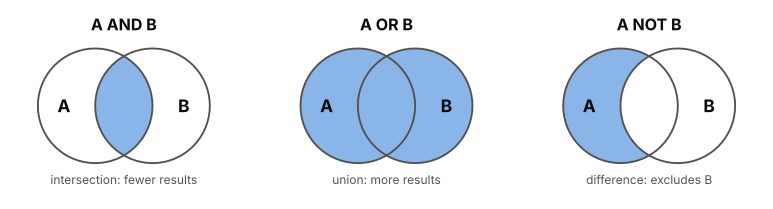
| Technique | What it does | Example |
|---|---|---|
| AND | All the terms: reduces results | mobile AND performance |
| OR | Any of the terms: broadens (synonyms) | mobile OR smartphone |
| NOT | Excludes a term | performance NOT sports |
| Parentheses | Group and order the operations | (mobile OR smartphone) AND performance |
| Quotation marks | Exact phrase | "academic performance" |
| Truncation | Variants of a stem | universit* finds university, universities… |
| Field searching | Only in title, author, abstract… | title:(smartphone) depending on the platform |
Each platform has its own syntax; each search engine’s help pages explain it. In addition, many databases use a controlled vocabulary (thesauri, subject headings): standardised terms that group synonyms and improve results.
3. Precision and recall
Two classic measures describe a search:
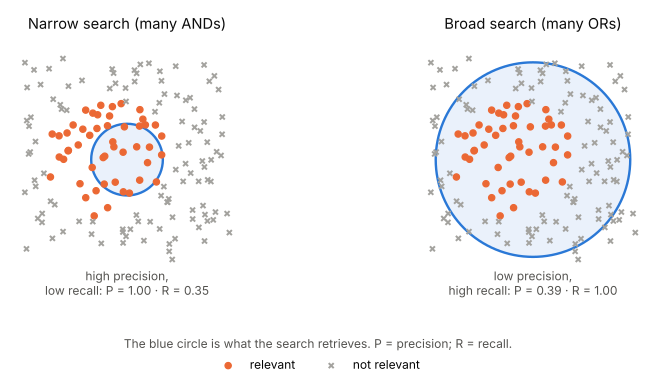
- Precision: of what I have found, what proportion is useful?
- Recall: of everything that would be useful, what proportion have I found?
They usually move in opposite directions: adding synonyms with OR increases recall and lowers precision; adding concepts with AND increases precision and lowers recall. A class assignment needs precision above all; a literature review needs recall.
4. General and specialised platforms
| Type | Examples | What for |
|---|---|---|
| General search engines | Google, Bing | General information, institutional websites, news |
| Academic search engines | Google Scholar, BASE, OpenAlex | Scientific literature in all fields |
| Library catalogues | UC3M library catalogue | Books and resources subscribed to by the university |
| Multidisciplinary databases | Web of Science, Scopus (with university access), Dialnet | Peer-reviewed articles, with filters and controlled vocabulary; Dialnet for literature in Spanish |
| Specialised databases | PubMed (biomedicine), ERIC (education), LISTA (library science) | Comprehensive searching in one field |
| Repositories | Recolecta, institutional repositories | Open access versions |
Some resources require you to log in with your university account or use the VPN from outside the campus.
5. Organising information
Finding is half the job: the other half is not losing what you found. It helps to:
- Save your search strategy (where, with which terms, when and how many results), so you can repeat it and explain it.
- Use a reference manager (Unit 4) to save documents with their details.
- Set up alerts in databases to receive new results.
- Take notes with the full reference from the start, so you do not have to look for it later.
R practice: Boolean operators from the inside
A search engine treats each term as the set of documents that contain it. In R, intersect() is AND, union() is OR and setdiff() is NOT:
Exercise 2.1
How many documents does (mobile OR smartphone) AND performance return?
The third concept is performance.
r <- intersect(union(mobile, smartphone), performance)
length(r)
Six documents: 1, 2, 8, 13, 4 and 16. Without the synonym smartphone you would only have found four: adding synonyms with OR increases recall.
Exercise 2.2
You have reviewed the six results and only four are useful. Calculate the precision of the search.
Precision is relevant divided by results.
relevant <- 4
results <- 6
relevant / results
0.67: two out of three results are useful.
Lab: live Boolean operators
Lab · live data from OpenAlex
Type two concepts (you can use OR, quotation marks and truncation within each one) and press Search. The book queries OpenAlex, an open index of more than 250 million scholarly works, and shows how many documents each combination retrieves. Watch how AND reduces, OR broadens and NOT excludes.
Try: add a synonym to A with OR and see how A AND B changes; then put a phrase in quotation marks and compare it with the same words without them.
Worked examples
Graded exercises
Basic. What does educa* AND (virtual OR online) retrieve?
Documents containing any word beginning with educa (education, educational, educator…) and at least one of the words virtual or online.
Intermediate. Write the search string for the question: “What effect does gamification have on secondary school students’ motivation?”.
One possible solution: (gamif* OR "serious game*" OR "game-based learning") AND (motivat* OR engagement) AND ("secondary school*" OR "secondary education" OR "high school*"). Others are correct if they keep the structure: OR within each concept, AND between concepts.
Advanced. Run your search string in two databases, note the results, review the first 20 in each and calculate what proportion is relevant (approximate precision). Propose an adjustment to improve it.
Present a table with database, date, search string, number of results and relevant documents among the first 20. The adjustment must be justified: if precision is low, restrict fields or add concepts; if known key documents are missing, add synonyms.
Activities
Esta actividad necesita JavaScript.
Esta actividad necesita JavaScript.
Esta actividad necesita JavaScript.
Assessed challenge
Self-assessment
Answer all the questions and press Show answers: correct answers turn green, wrong ones red, and you will see your score. You can change your answers and check again. It does not count towards your mark.
- To broaden a search with synonyms you use the operator
universit*is an example of- Adding concepts with AND usually increases precision and reduces recall.
- According to Bates, real searching is a single query that returns the perfect set of documents.
- If I find 20 documents and 5 are useful, precision is
- What are quotation marks used for in a search?
- To search the biomedical literature comprehensively, the most suitable platform is
- The proportion of all relevant documents that a search retrieves is its
- A thesaurus is an example of a vocabulary
- In
(mobile OR smartphone) AND performance, the parentheses make OR be resolved before AND.
- OR adds sets together: any of the terms.
- The asterisk retrieves all endings of the stem.
- Each AND requires one more concept: fewer, more relevant results.
- It is a berrypicking process that changes as you read.
- 5 / 20 = 0.25.
- Quotation marks fix the whole phrase, in order.
- PubMed is the specialised biomedical database.
- Recall is also called sensitivity.
- It standardises terms and groups synonyms.
- Just like in an arithmetic operation.
Further resources
| Resource | What it is for |
|---|---|
| OpenAlex | Open index of the scientific literature |
| BASE | Search engine for open access academic documents |
| Dialnet | Scientific literature in Spanish |
| Recolecta | Spanish open access repositories |
| The information literacy user’s guide, search chapters | Open textbook |
Bates, M. J. (1989). The design of browsing and berrypicking techniques for the online search interface. Online Review, 13(5), 407–424. https://doi.org/10.1108/eb024320
Cruz Gil, C. (2015). Modelos de búsqueda y recuperación de la información. Trea.
Marchionini, G. (2006). Exploratory search: From finding to understanding. Communications of the ACM, 49(4), 41–46. https://doi.org/10.1145/1121949.1121979
Pacios Lozano, A. R. (2013). Técnicas de búsqueda y uso de la información. Ramón Areces.